How to Redeem Horde Defenders Codes
Exact in-game path from tutorial unlock to a successful Redeem press — plus fixes when a code fails.
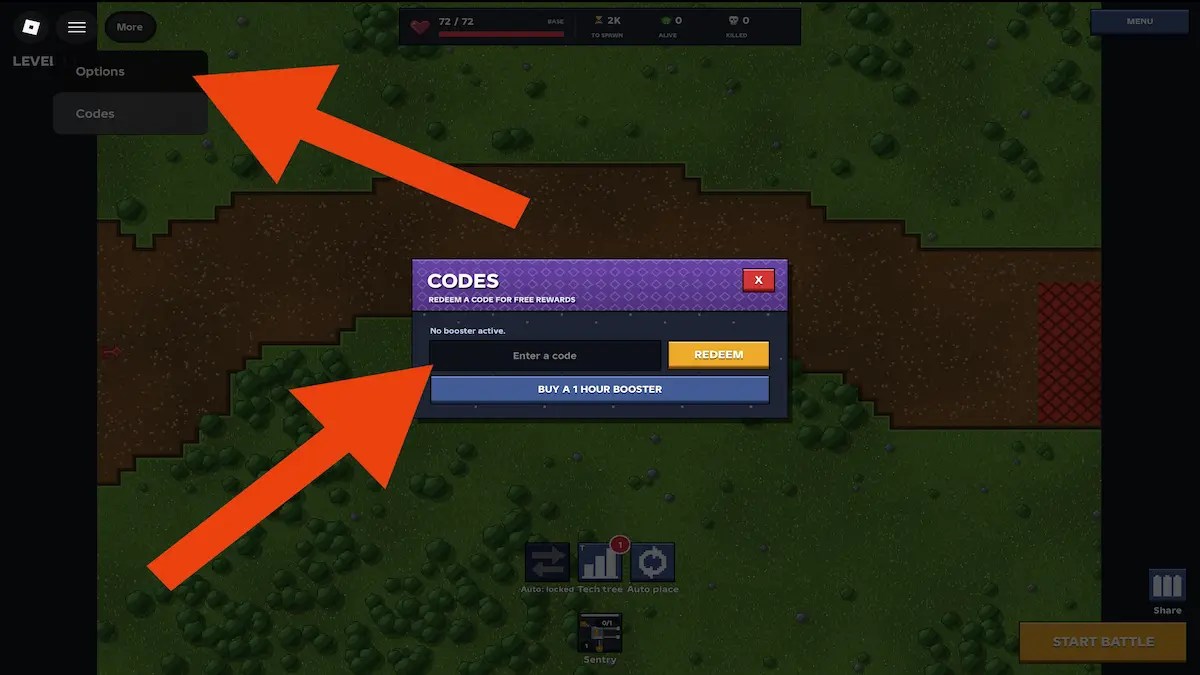
Redeeming codes in Horde Defenders is simple once the HUD unlocks, but the menu stays hidden until you finish or skip the tutorial. This guide walks through every step for the Roblox alpha by Horizon Studios, explains what a successful claim looks like, and covers the usual reasons a paste fails. Pair it with the live list on the Codes Hub and the drop guide at Where to Find Codes.
Horde Defenders is a solo-focused (server size 1), manual-aim tower defense game: towers fire where you aim, and high ground improves range and damage. Free Scrap, Gems, boosters, and skins from codes therefore matter more than in solo-focused play titles — nobody else is funding your outpost. Learning the redeem flow on day one keeps those rewards from sitting unclaimed while you grind the 59 campaign levels across five alien worlds.
Before you start
- Play on the official place: Horde Defenders on Roblox.
- Use the Roblox account you actually play on. Codes are generally one redeem per account.
- Have the current codes ready from the Codes Hub (
SORRY,BIGCODE,GIBILOSTHISSCRAP,IMAGEISAWESOME,LAUNCH,PART1as of October 2026). - Prefer copy-paste over retyping. Codes are case-sensitive and often long (
GIBILOSTHISSCRAP).
Optional but smart: finish a short session of Getting Started so you already know where Scrap and boosters should go after they land.
Step-by-step redeem path
1. Launch the game
Open Roblox, join Horde Defenders, and wait for the client to load into the outpost flow. If Roblox shows a place update, accept it first — stale clients sometimes hide new UI buttons.
2. Finish or skip the tutorial
The Codes entry lives under More, and that menu only appears after the tutorial is completed or skipped. If you are still stuck in onboarding prompts, you will not see a reliable Codes window. Skipping is fine if you already understand basic placement; otherwise complete the tutorial once so manual aim and elevation tips stick.
3. Open More (upper-left)
Look at the upper-left of the screen for the More control. Tap or click it to expand the secondary menu. Exact icon art can change during alpha patches, but the location has stayed upper-left in current builds.
4. Open Codes
Inside More, select Codes. A redeem panel should appear with a text field and a Redeem button (often highlighted in a bright accent color).
5. Paste one code
Paste a single code with no leading or trailing spaces. Do not stack multiple codes in one field. Start with high-value bundles such as GIBILOSTHISSCRAP or PART1 if you want Scrap immediately, or SORRY if you care about Dreadnought and Stormcaller skins first.
6. Press Redeem and confirm
Press Redeem. On success you should see confirmation feedback and the rewards should appear in your currencies or cosmetics inventory: Scrap, Gems, a timed booster, and/or tower skins. Then clear the field and redeem the next code.
7. Activate boosters on purpose
Boosters from codes (LAUNCH, BIGCODE, GIBILOSTHISSCRAP, IMAGEISAWESOME, PART1) are timed. Start them when you are about to play a focused block — campaign push, Challenge, Endless, or Workshop testing — not while you AFK in the lobby.
What each successful reward looks like
- Scrap: Balance increases; spend on placing and upgrading towers from the 18-tower roster.
- Gems: Premium-leaning currency; save for high-value unlocks rather than impulse spends.
- Boosters: Timed progress buff (30 minutes to 2 hours depending on the code).
- Skins (
SORRY): Cosmetic variants for Dreadnought and Stormcaller — confirm they show on those towers in your loadout UI.
If Scrap from PART1 looks lower or higher than a guide predicted, that is expected: some outlets list ~5,000 Scrap while Destructoid has listed 2,000. Keep the booster, note what you received, and move on.
Troubleshooting: code will not redeem
Extra spaces or bad capitalization
Re-copy from the Codes Hub. Delete the field contents fully before pasting again. Avoid adding spaces before or after the string.
Tutorial still active
Finish or skip the tutorial, then reopen More → Codes. If More itself is missing, you are probably still gated.
Already redeemed
Most codes work once per account. A failure after a previous success usually means the account already claimed it. Try another code from the active list.
Expired or mistyped code
Alpha codes can expire quietly. Cross-check the live table on the Codes Hub and ignore random chat spam. For trusted drop locations, see Where to Find Codes.
Wrong game or place
Confirm you are in Horizon Studios’ Horde Defenders place (universe tied to the official Roblox listing), not a similarly named fan place.
Client desync
Rejoin the experience, or restart Roblox, then try again. Alpha UI can lag behind after a patch.
After you redeem: spend Scrap like a defender
Codes are only valuable if the resources improve your outpost:
- Prioritize high-ground placements so range and damage bonuses apply while you manually aim.
- Mix damage towers with control options (Barricade, Barbed Wire, Tar Lobber) before boss waves.
- Compare tower roles on the Tier List once you have enough Scrap to experiment.
- Track patch timing on the Updates Hub — new codes often land beside content drops.
Avoid third-party “auto redeem” tools. Anything that injects into the Roblox client falls under script/executor territory and carries ban risk; read the Scripts Hub disclaimer if you were researching those separately. Official codes never require an executor.
Checklist you can reuse every drop
- Open the Codes Hub and copy the newest strings.
- Launch Horde Defenders on the correct account.
- Finish/skip tutorial if needed.
- More (upper-left) → Codes → paste → Redeem.
- Verify Scrap / Gems / booster / skins.
- Start boosters only when you are ready to play.
- Follow Horizon Studios on Roblox for the next drop: community group.
Master this loop once and every future code takes under a minute. That minute of hygiene is often worth thousands of Scrap and a cleaner path through Challenges, Endless, and the rest of the campaign.
Frequently Asked Questions
Quick answers to the most common Horde Defenders questions.
Where is the Codes button in Horde Defenders?
After you finish or skip the tutorial, open More in the upper-left corner, then select Codes. The redeem field and Redeem button appear in that panel.
Do I have to finish the tutorial to redeem?
You must finish or skip it. The Codes menu stays unavailable while tutorial gating is active, so clear that step first.
Can I redeem the same code twice?
No. Codes are generally limited to one successful redeem per Roblox account. A second attempt usually fails even if the code is still active for other players.
Why did my code say it failed after I pasted it?
Common causes are extra spaces, wrong capitalization, an expired string, an already-redeemed code, or still being inside the tutorial. Re-copy from the Codes Hub and try again after rejoining if needed.
When should I activate booster rewards?
Start boosters when you can play a focused session — campaign levels, Challenges, Endless, or Workshop testing. Do not burn the timer while idle in the menu.
Is redeeming codes against Roblox rules?
No. Official in-game promo codes are allowed. Third-party scripts and executors are a different topic with ban risk; see the Scripts Hub for the disclaimer.